BINOLLA · GLOBAL ENGLISH PAGE · TESTED OCTOBER 2, 2026
Binolla Broker: Official Site, Demo, Login and Trading Platform
Binolla is a short-term digital-options platform whose live terminal currently labels the product as Fixed Time. We checked the direct demo route, registration form, $1 trade entry, live profitability display, deposit cashier, withdrawal screen and account-verification area before building this page.
Sponsored links: we may receive compensation after a qualifying signup. Trading can result in loss of the full amount committed to a trade. Check availability and account terms for your country before funding.
ACCESS PATHS
Binolla Official Site, Sign Up and Login
Binolla separates three useful entry paths. The standard site opens the public homepage, the signup URL opens the account-registration form, and the demo-access URL goes straight to a practice terminal. For a visitor who only wants to inspect the interface, registration is not a prerequisite for the direct demo route we tested.
Use the normal Binolla homepage when you want the public platform information and access menu.
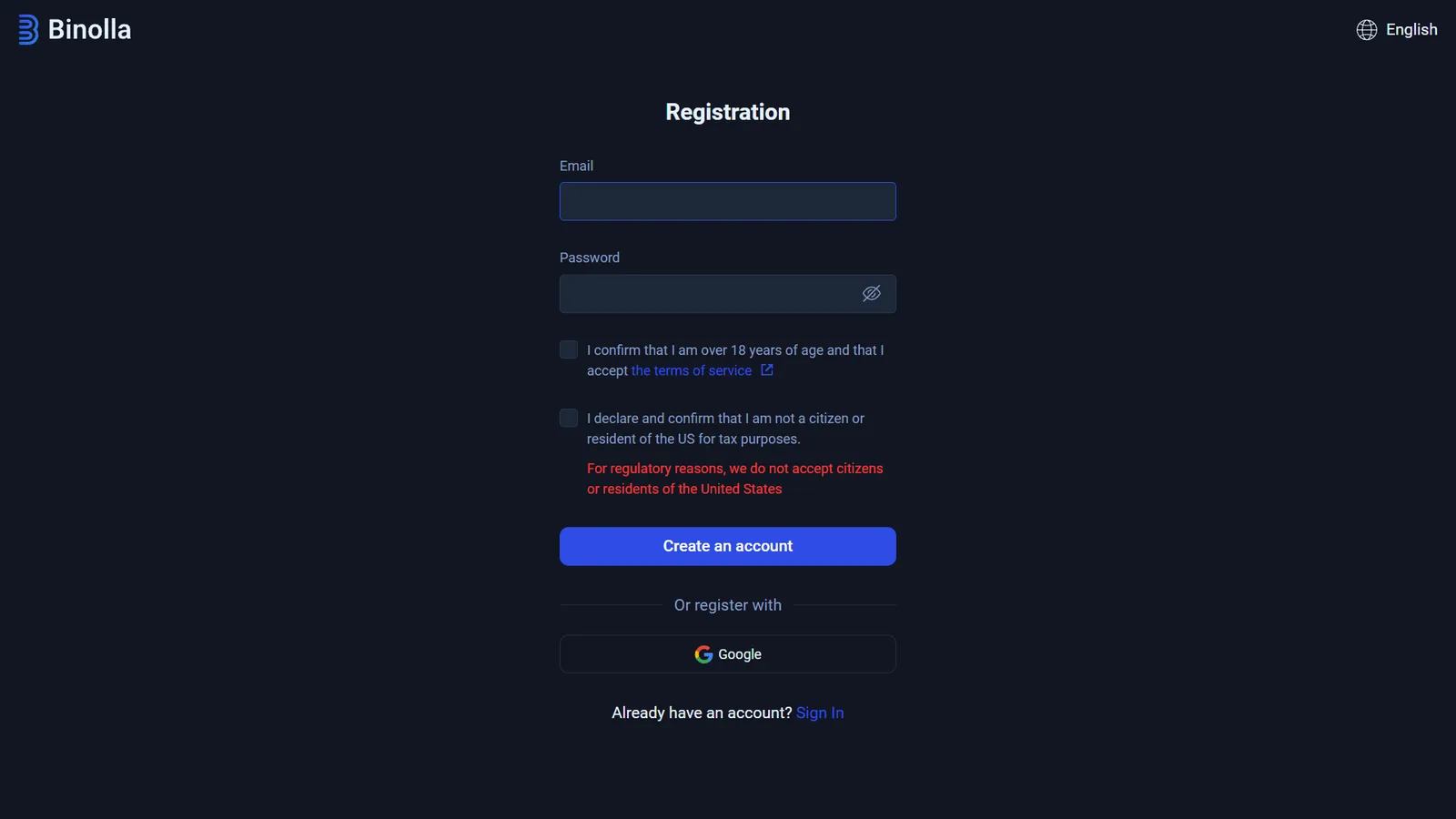
Open official site →The current form asks for email and password, confirms age 18+, accepts the terms and explicitly excludes US citizens or residents.
Open registration →Existing users can use the Sign In route from the registration screen. Do not create another account simply to reach the demo.
FIRST-HAND DEMO CHECK
Binolla Demo Account Without Registration
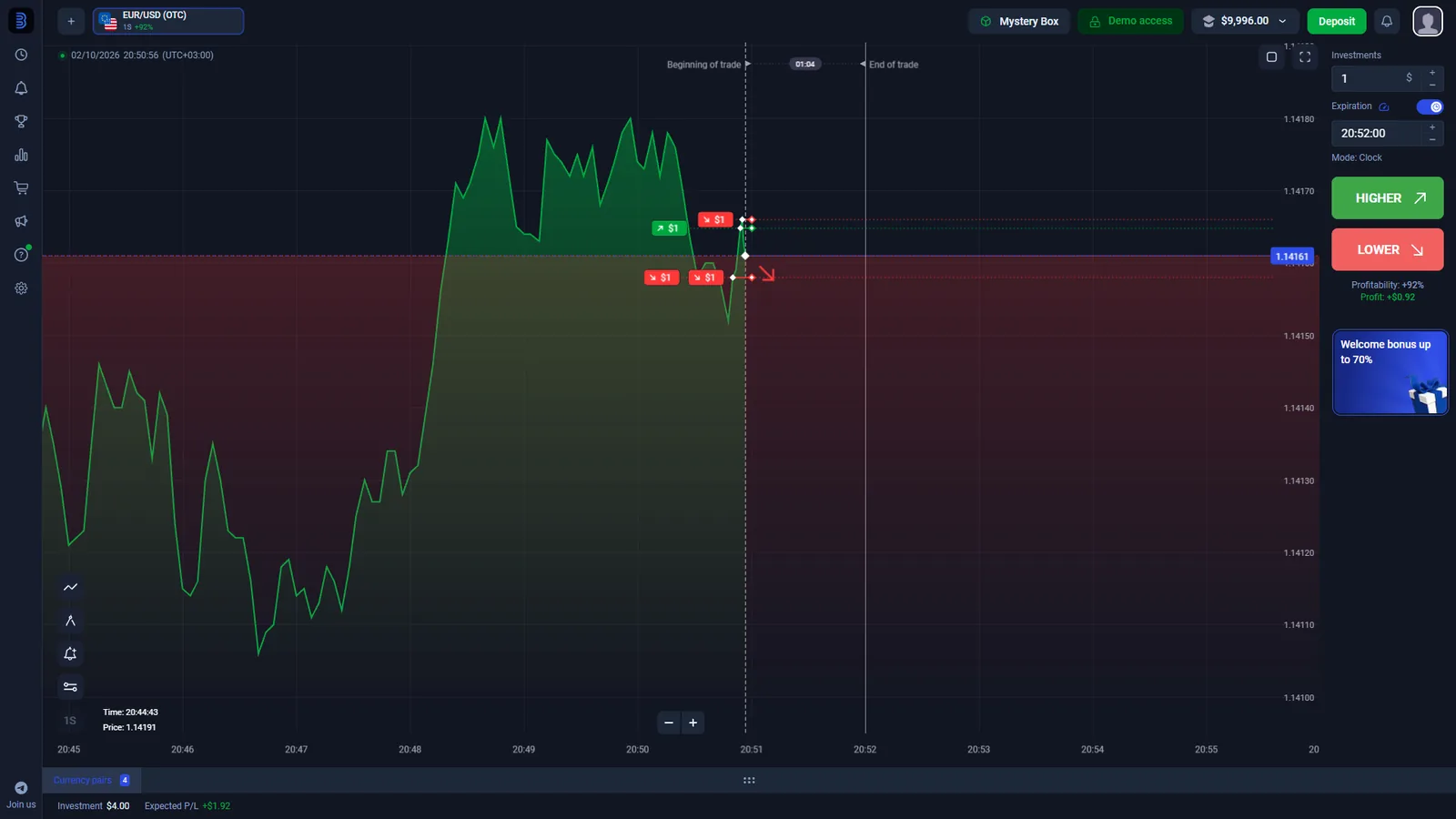
Our demo-access affiliate link opened a working Binolla practice terminal immediately. The screen displayed a green Demo access indicator, a virtual balance, the EUR/USD (OTC) asset, an investment field, expiration control and the Higher / Lower direction buttons.
This matters because some older Binolla pages still describe registration before practice, while Binolla separately launched a one-click demo route in 2025. The current route we tested on October 2, 2026 did not require us to fill out the registration form first.
What we verified: direct demo URL → terminal opens → virtual balance visible → $1 investment field → Higher/Lower available.
The demo is a platform test, not evidence that deposits or withdrawals will behave the same way in every country. It also does not prove profitability with real money. For a broader comparison of practice-account access across platforms, see our binary options demo account guide.
Want to inspect the platform first?
The direct demo is the cleanest route because it does not force account creation before the terminal opens.
Open Binolla DemoHOW THE PRODUCT WORKS
How the Binolla Fixed Time Trading Platform Works
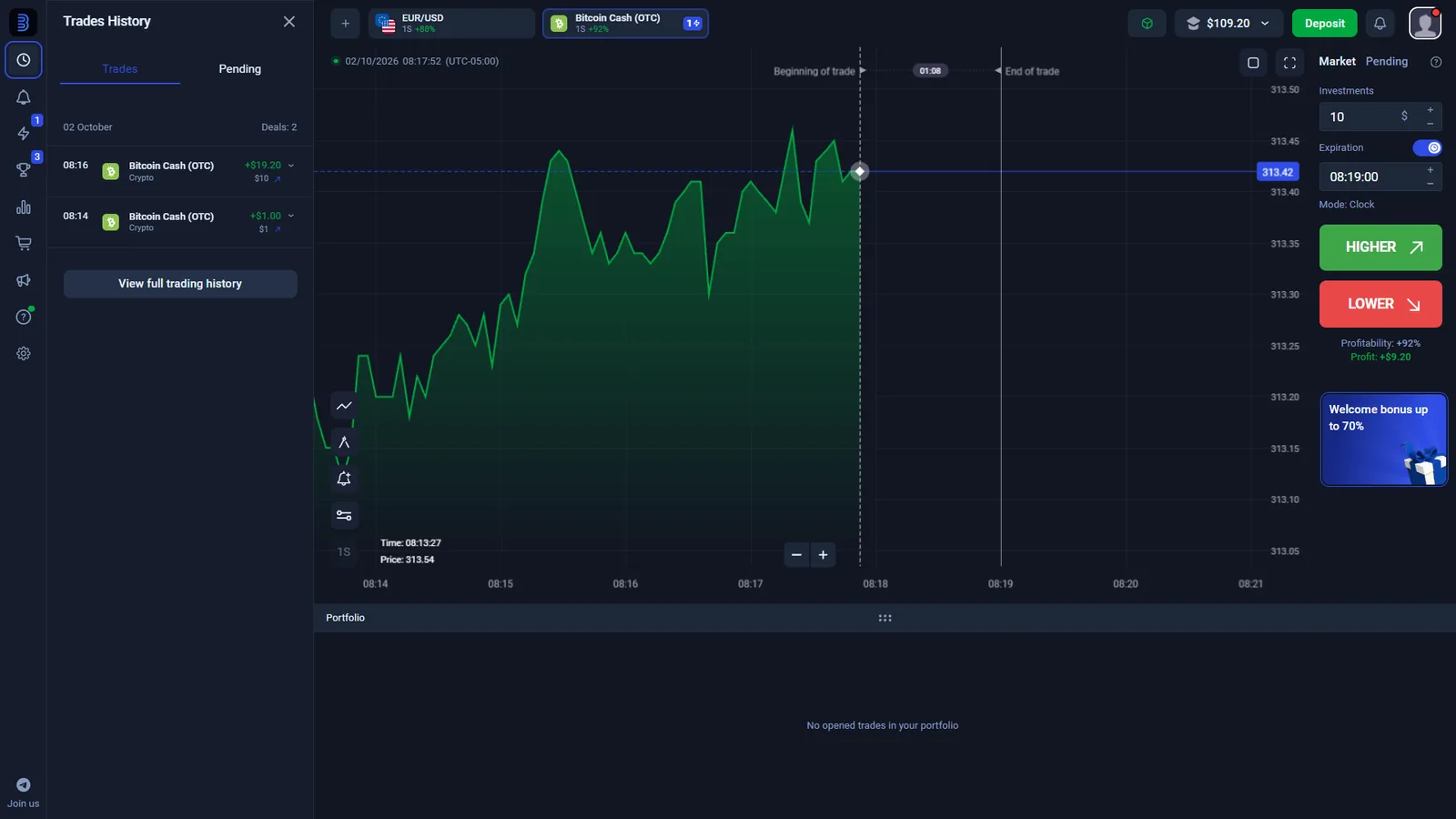
Binolla’s current trading screen uses a short order flow rather than a conventional exchange-style buy-and-hold ticket. In the sessions we checked, a trader selects an asset, enters the investment amount, chooses an expiration time and then chooses whether the price will finish Higher or Lower relative to the reference level at expiry.
Asset tabs can include currency pairs and OTC-labelled instruments. Our captures included Bitcoin Cash (OTC) and EUR/USD (OTC).
The terminal exposes an editable Investments field. We successfully used $1 in the current interface.
The order ticket shows the contract end time. A short expiry changes the risk profile; it is not a substitute for a stop-loss order.
The outcome depends on the price relationship at expiry. The displayed profitability is set before the order and can change between assets and sessions.
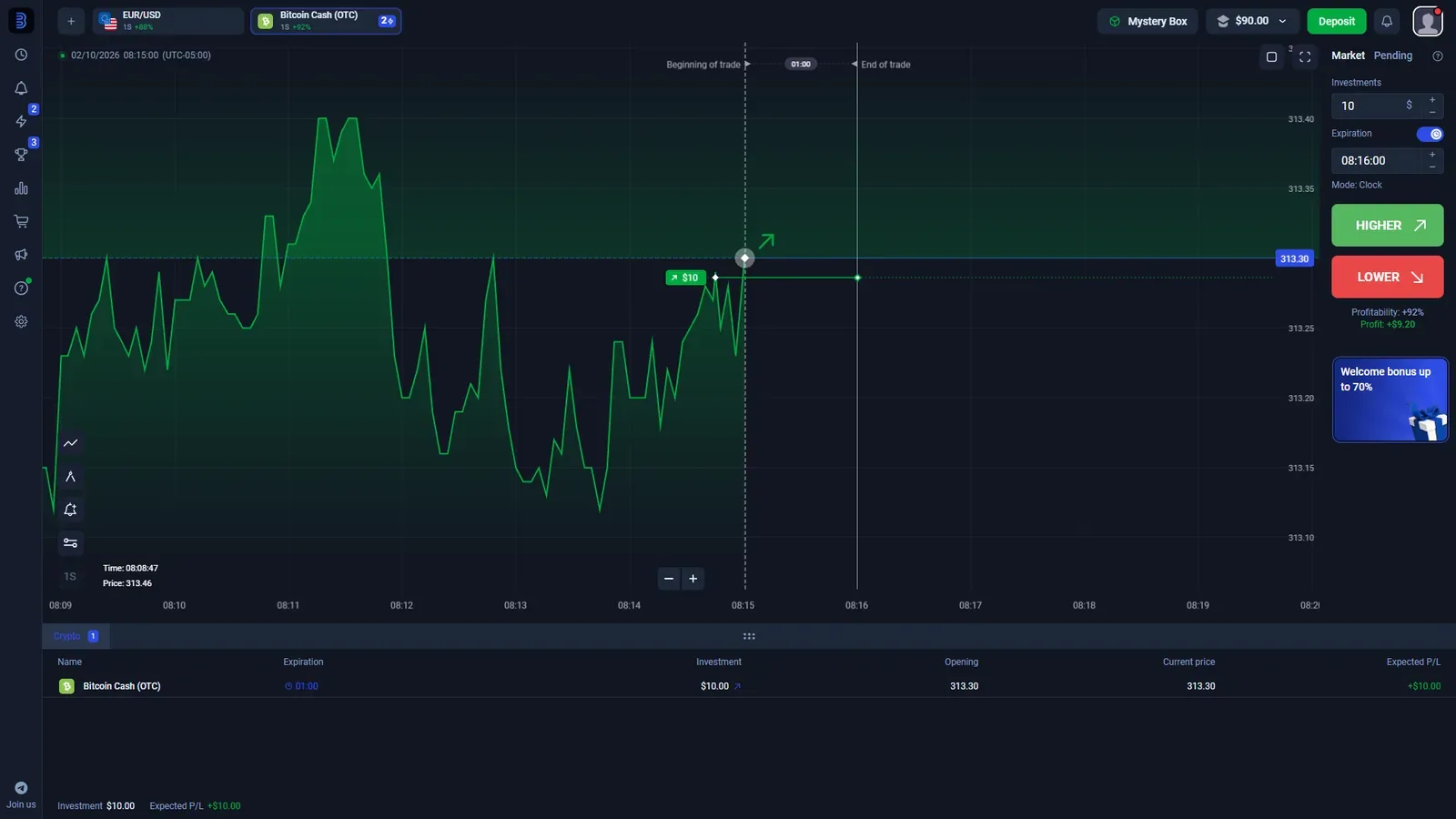
Terminology: Binolla’s education describes these contracts as digital options, while the live product interface we tested is presented through its Fixed Time workflow. We use the interface wording when describing what is on screen.
OBSERVED ORDER SIZE
$1 Binolla Trades and Displayed Payout
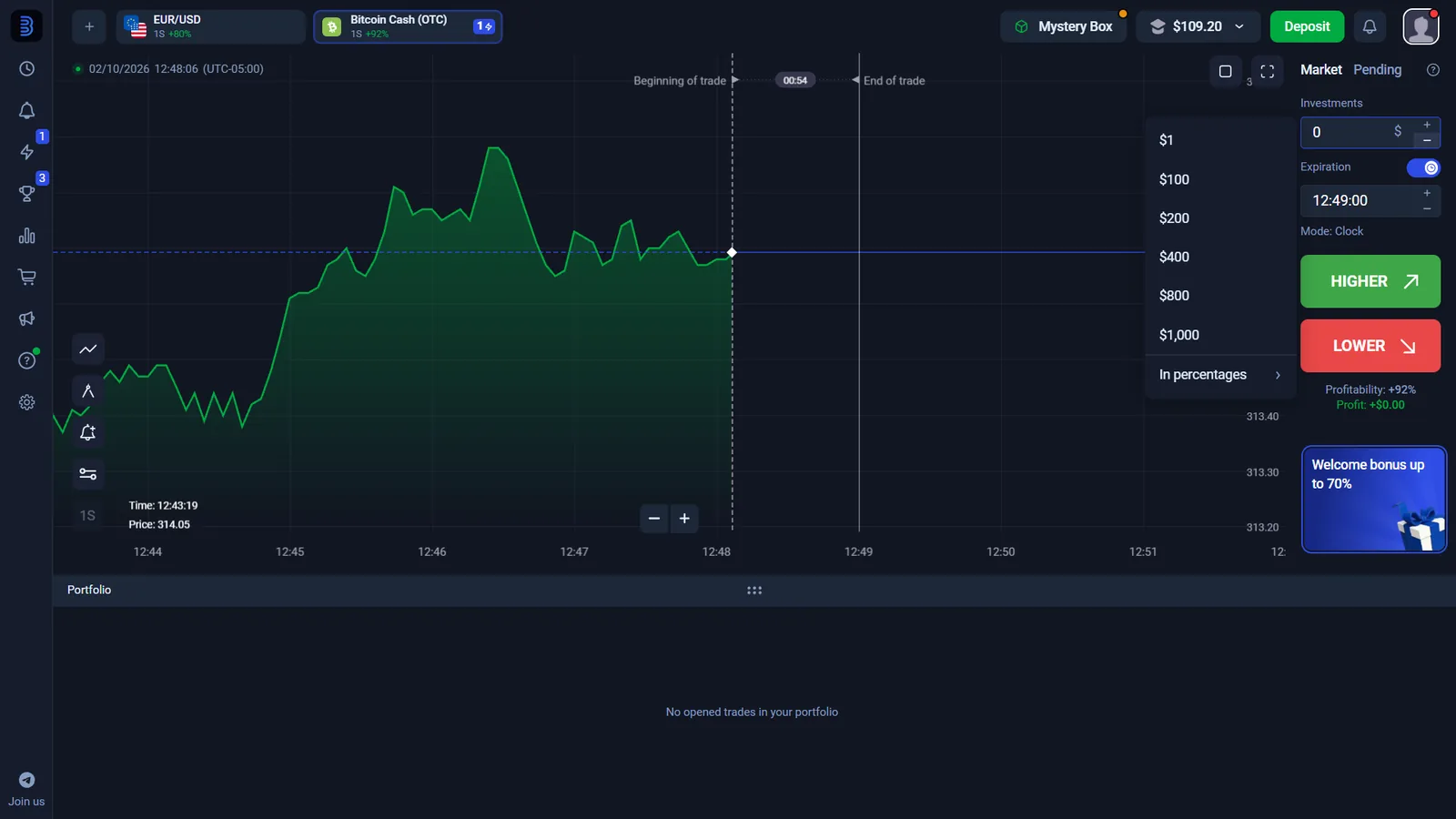
We were able to set and place $1 trades in the Binolla terminal. That is stronger evidence than repeating a marketing minimum from a third-party page. We still avoid treating $1 as a permanent universal minimum because account configuration, product settings or future platform changes can alter the live floor.
The same session displayed +92% profitability on the tested OTC asset. That number is not a fixed account return. Binolla changes the displayed percentage by instrument and market state, so the number visible immediately before the order is the relevant figure.
Do not read “+92%” as a guaranteed 92% profit. It was an observed terminal value, and a losing fixed-time trade can lose the amount committed to that trade.
EVIDENCE AFTER THE ORDER
Binolla Assets, OTC Markets and Trade History
Our account captures show the asset browser and completed-trade history rather than only a marketing landing page. The interface includes OTC-labelled instruments alongside other markets, and completed positions appear in Trades History with the asset and outcome data. Pending-order controls are also present, but they are a separate workflow and should not be confused with a normal Market order.
CASHIER CHECK
Binolla Minimum Deposit and Payment Methods
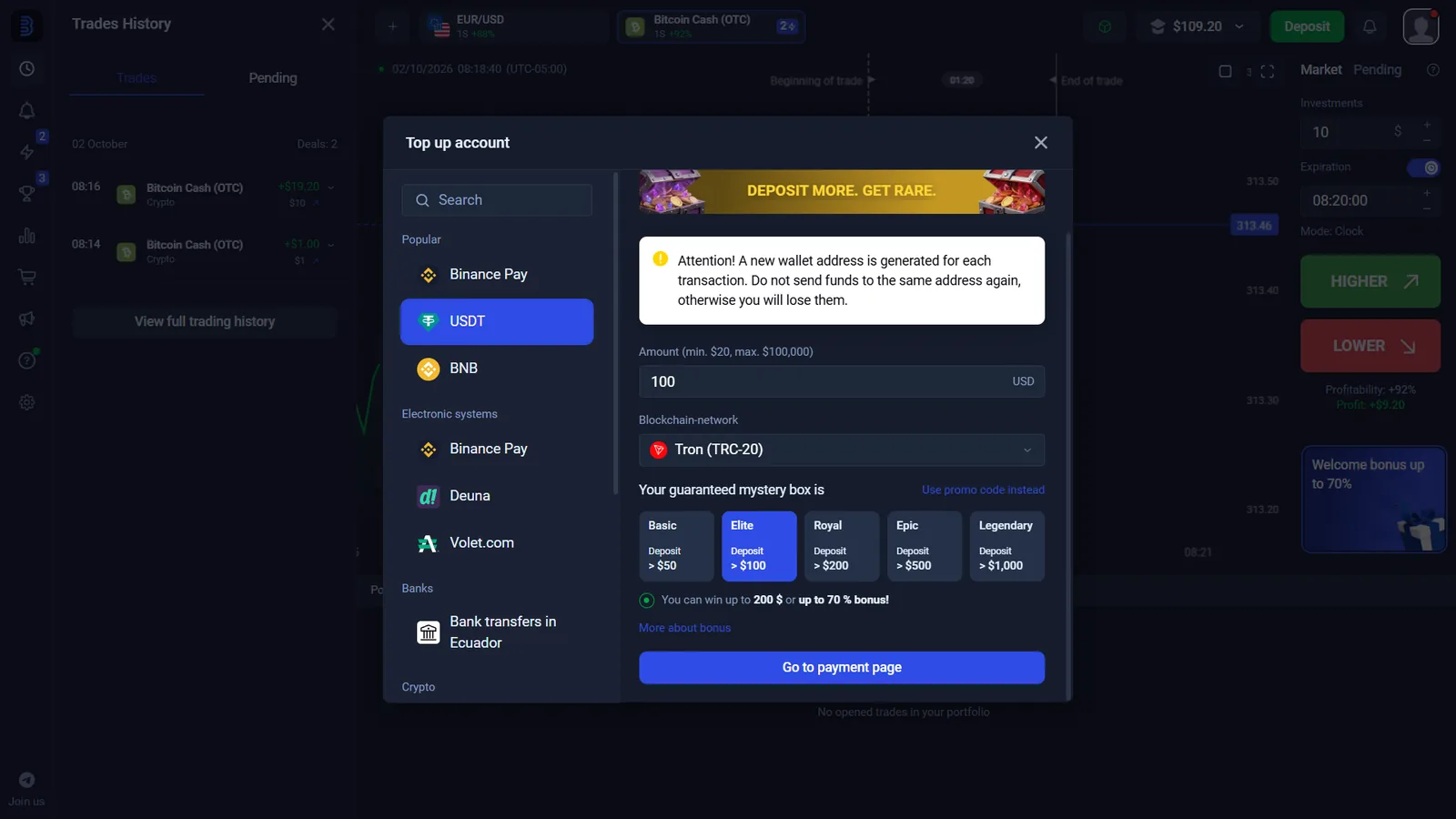
The logged-in cashier we inspected exposed multiple funding routes, including Binance Pay, USDT, BNB, Volet.com, crypto assets and a local bank-transfer route. The exact list is account- and region-sensitive, so it should not be presented as a worldwide guarantee.
In one captured USDT flow, the cashier displayed a $20 minimum, a $100,000 maximum and the Tron (TRC-20) network. A separate BNB screen also showed a $20 minimum, while a bank-transfer route in the checked session showed a $10 minimum. We therefore do not present one universal Binolla minimum deposit: the amount shown depends on the payment route, region and account. These are dated interface observations, not a promise that every user will receive the same limits.
Before sending crypto: match the asset and network shown in your own cashier. Sending to a different network can make recovery difficult or impossible.
Ready for a real account?
Use the signup route only after checking whether Binolla is available where you live and reviewing the live cashier terms.
Create Binolla AccountWITHDRAWAL INTERFACE CHECK
Binolla Withdrawals: What We Saw and What We Did Not Test
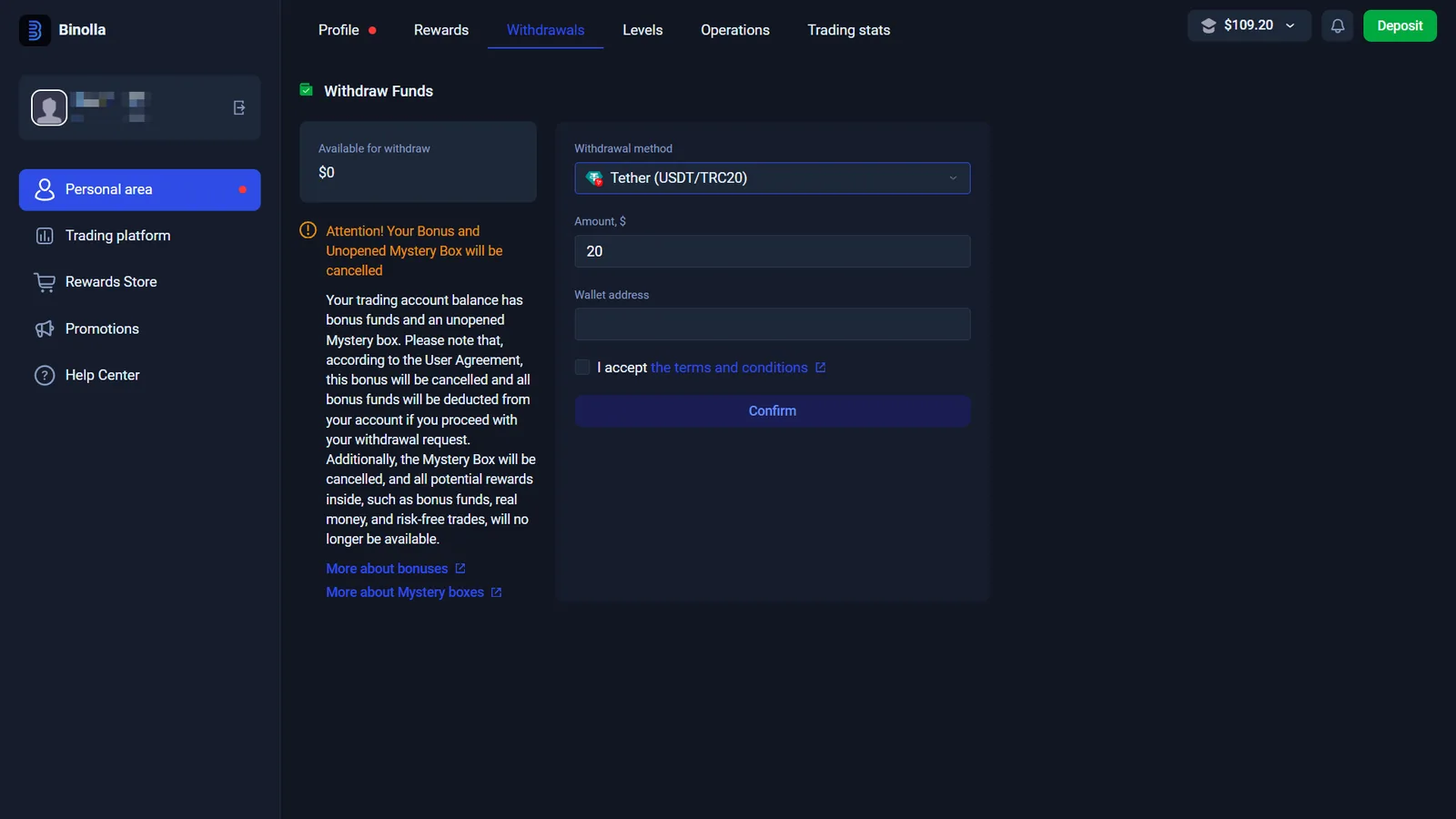
The withdrawal area in our account showed Tether (USDT/TRC20) as a selectable method and requested an amount, wallet address and acceptance of the relevant conditions. The same area warned that withdrawing can affect bonus funds or unopened promotional benefits.
Binolla’s current FAQ says the withdrawal method is generally tied to the method used for funding under its payment/AML rules, that many methods have a minimum around $10, and that account verification is required before withdrawal. Binolla states that its own processing normally takes up to one hour but can extend to 48 hours, after which the payment provider can take additional time.
Our evidence level: withdrawal screen checked; real payout not completed. We therefore do not claim “fast withdrawal tested” or quote our own successful payout time. For the site-wide payment flow and the difference between deposit and withdrawal checks, see our binary options deposit and withdrawal guide.
ACCOUNT CONTROLS
Binolla Verification, KYC and Account Security
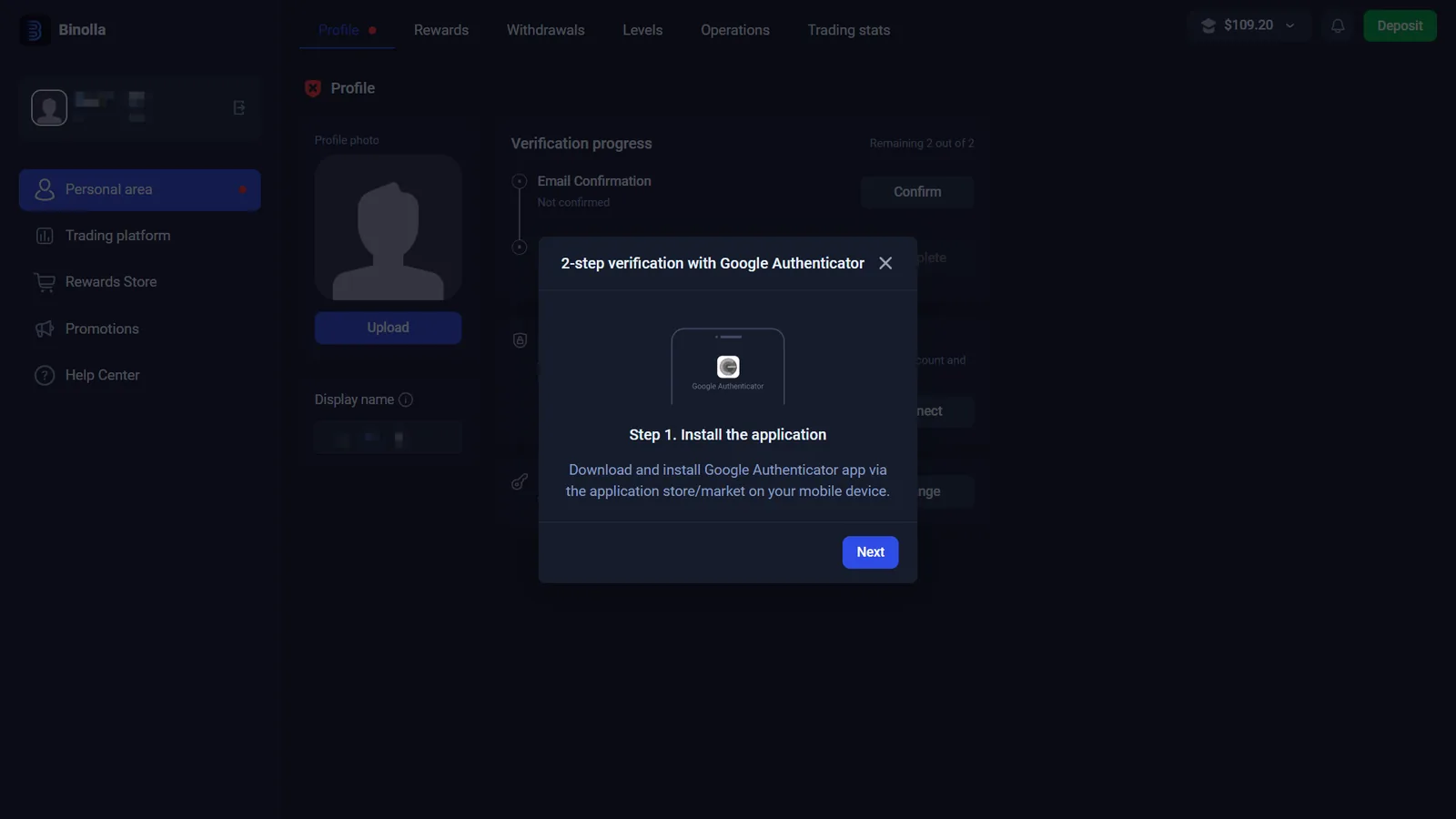
The Personal Area in our checked account had a dedicated Verification progress panel. It showed Email Confirmation as not confirmed and Identity verification as not completed. A separate two-step verification flow offered Google Authenticator.
This is enough to confirm that identity verification exists as an account step. Binolla’s current withdrawal FAQ also states that users must complete account verification to withdraw funds. We did not submit identity documents, so we do not claim a specific approval time.
- Email confirmation is tracked separately.
- Identity verification is a distinct status item.
- Google Authenticator can be connected for two-step verification.
- Verification should be completed using accurate personal information that matches the payment account.
MOBILE ACCESS
Binolla App and Mobile Trading
Binolla says its platform works on desktop and mobile devices, and an Android listing for Binolla Trading Analytics is currently published on Google Play under Zen E-Way LLC. The listing was updated in August 2026. The public Binolla site also exposes web-app access.
For this page we treat Android app and mobile web access as current supported routes. We do not advertise an iOS native app or unofficial APK download because those paths were not independently verified in this check.
COMPANY & AVAILABILITY
Binolla Company, Regulation and Restricted Countries
Binolla’s current website identifies the operator as ZEN E-WAY LLC, registration number 2334 LLC 2022, with a registered address in Kingstown, St. Vincent and the Grenadines. The site currently states that the company is authorized and regulated by the Mwali International Services Authority (MISA) under license T2023319.
There is an important verification caveat. An indexed MISA record for ZEN E-WAY LLC lists the same license number and marks the status as Active, but that record also shows a license end date of July 5, 2025 and is not a fresh 2026 verification page. Because those fields are inconsistent, we do not present the 2026 regulatory status as independently settled. Check the current regulator record and the legal entity shown in your account documents before relying on a licensing claim.
ZEN E-WAY LLC
Registration №2334 LLC 2022
St. Vincent and the Grenadines
Binolla’s homepage footer currently highlights the USA, Canada, EEA, UK and Hong Kong and also states that services are not offered to persons under 18. Binolla’s User Agreement contains a broader list of restricted territories, so check the current agreement and onboarding availability before registering.
Availability is not the same as local authorization. A signup page working in a country does not by itself mean the platform is licensed there. This global English page therefore does not claim universal availability. For the broader distinction between platform access, licensing and local rules, see our binary options regulation guide.
SECONDARY FEATURES
Binolla Bonus, Rewards Store and Loyalty Levels
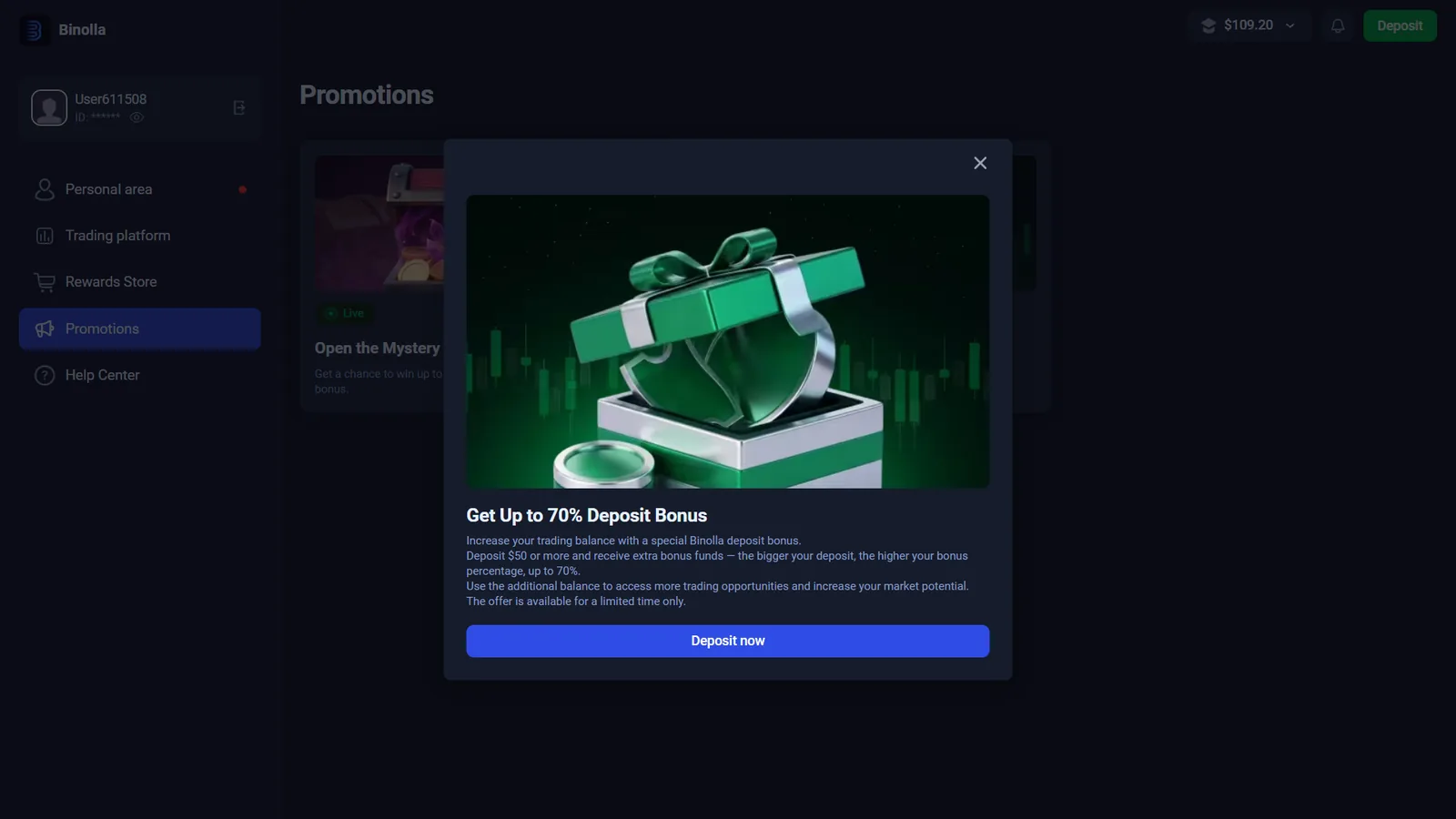
The account we checked displayed a promotion advertising a deposit bonus of up to 70%, a Mystery Box feature, a Rewards Store and tiered loyalty levels. These are secondary account features, not the reason we classify the platform or the basis for evaluating a trade.
Bonus money can come with conditions that affect withdrawal eligibility or account balances. The withdrawal screen itself displayed a warning about losing bonus-related benefits when funds are withdrawn. Read the live promotion terms rather than treating the headline percentage as cash-equivalent value.
Binolla FAQ
Binolla is an online trading platform operated on its website by ZEN E-WAY LLC. The live terminal we tested uses a Fixed Time workflow with investment amount, expiration and Higher/Lower direction controls.
The public platform is binolla.com. On this page, the Official Site button uses our tracked Binolla homepage link, while separate tracked links are used for signup and direct demo access.
Yes in the direct demo route we tested on October 2, 2026. Our demo-access link opened the practice terminal without first completing the registration form, and the terminal displayed a Demo access indicator and virtual balance.
The current signup form asks for email and password, requires confirmation that the user is over 18 and accepts the terms, and states that US citizens or residents are not accepted. A Google registration option is also displayed.
We were able to set and place $1 trades in our October 2, 2026 Binolla terminal session. We treat that as a tested order value, not a guarantee that $1 will remain the universal minimum for every account or future platform version.
We did not see one universal minimum across all payment routes. In our checked account, one bank-transfer route showed a $10 minimum, while USDT and BNB deposit screens showed $20 minimums. The amount can vary by payment method, region and account.
Our account showed a withdrawal form with USDT/TRC20, amount and wallet-address fields, but we did not complete a real payout. Binolla currently states that verification is required, many methods have a minimum around $10, and its processing can take up to 48 hours before additional payment-provider time.
Binolla has a separate identity-verification status in the Personal Area, and its current withdrawal FAQ says account verification must be completed to withdraw funds. We inspected the verification interface but did not submit identity documents.
An Android listing for Binolla Trading Analytics is currently published on Google Play under Zen E-Way LLC, and Binolla also states that the platform is available on mobile devices and through web access. We did not verify a native iOS app in this check.
CHOOSE THE ROUTE THAT MATCHES YOUR INTENT
Demo First, Sign Up When You Are Ready
You do not need to create an account just to inspect the current Binolla demo terminal. If you decide to register, use the separate signup route and check your country availability, cashier limits and verification requirements before funding.
Testing date: October 2, 2026. Platform conditions, availability, payout percentages, payment methods, bonus terms and regulatory records can change.