POCKET OPTION REVIEW • PLATFORM TESTED
Pocket Option Review 2026: Official Site, Demo, Signals & Social Trading
Pocket Option is one of the more feature-heavy short-term trading platforms we have tested. During our hands-on test we placed $10 trades, opened the full asset menu, applied indicators, used built-in Signals, inspected Social Trading profiles and checked the logged-in deposit and withdrawal screens. The trading session used the QT Demo account; the cashier was checked separately before funding. The strongest reason to consider Pocket Option is the combination of a simple trade ticket with social and signal tools; the main trade-off is limited top-tier regulatory protection and country restrictions.
Platform Tested + Cashier Checked on September 3, 2026, including $10 trades in the QT Demo account and a logged-in cashier review.
Users who want a browser-based demo, built-in Signals and Social Trading in the same account.
Sponsored affiliate link. Pocket Option availability and account features vary by country. Check the destination domain and current account terms before funding.

Pocket Option Review: Quick Verdict
Our 2026 verdict is 4.7/5. Pocket Option stands out because the core higher/lower ticket is surrounded by useful platform features rather than hidden behind a complicated terminal. In our test we traded EUR/USD OTC with $10 positions, moved through the asset catalogue, added indicators, used Signals and inspected Social Trading without leaving the browser workflow.
The score rewards platform usability, demo access, feature breadth, Signals, Social Trading and the amount of the product we could verify first-hand. We deduct for limited top-tier regulatory protection, country restrictions and the funded-account requirement for copying ranked traders. It is a product-review score, not a safety rating.
The platform is most convincing for people who specifically want demo access, technical indicators, built-in Signals and Social Trading. It is less convincing for anyone who requires FCA-style investor protection, long-term asset ownership or a product where another trader can be copied without first moving into a funded real account.
| Key point | What we found |
|---|---|
| Official public domain | pocketoption.com |
| Evidence level | Platform Tested + Cashier Checked |
| Demo | Working demo terminal; our session showed a QT Demo USD balance around $50,000 |
| Minimum trade | $1 in Pocket Option’s current trading guide; our recorded demo trades used $10 |
| Assets seen | Currencies, cryptocurrencies, commodities, stocks and indices, including many OTC symbols |
| Signals | Built-in Signals panel tested; Copy signal was used in demo |
| Social Trading | Rankings and profiles inspected; copied-trader execution required adding money |
| Cashier check | $10 account top-up minimum shown in our account; route minimums varied |
| Withdrawal screen | $10 minimum and $0 commission displayed in our account |
| Trade test | $10 positions placed and results observed in the QT Demo account |
Our Pocket Option Platform Test
We rebuilt this review around a fresh first-hand test rather than relying on old marketing screenshots. On September 3, 2026, we used the Pocket Option browser platform, placed $10 trades, reviewed the resulting positions and checked the main features a new user is likely to touch before deciding whether to fund an account.
Our session covered the trading terminal, asset browser, payout display, technical indicators, trade placement and results, the Signals panel, Copy signal and Social Trading profiles. We then opened Finance and checked the current deposit and withdrawal screens. Under our review methodology, that gives this review two evidence levels: Platform Tested and Cashier Checked.
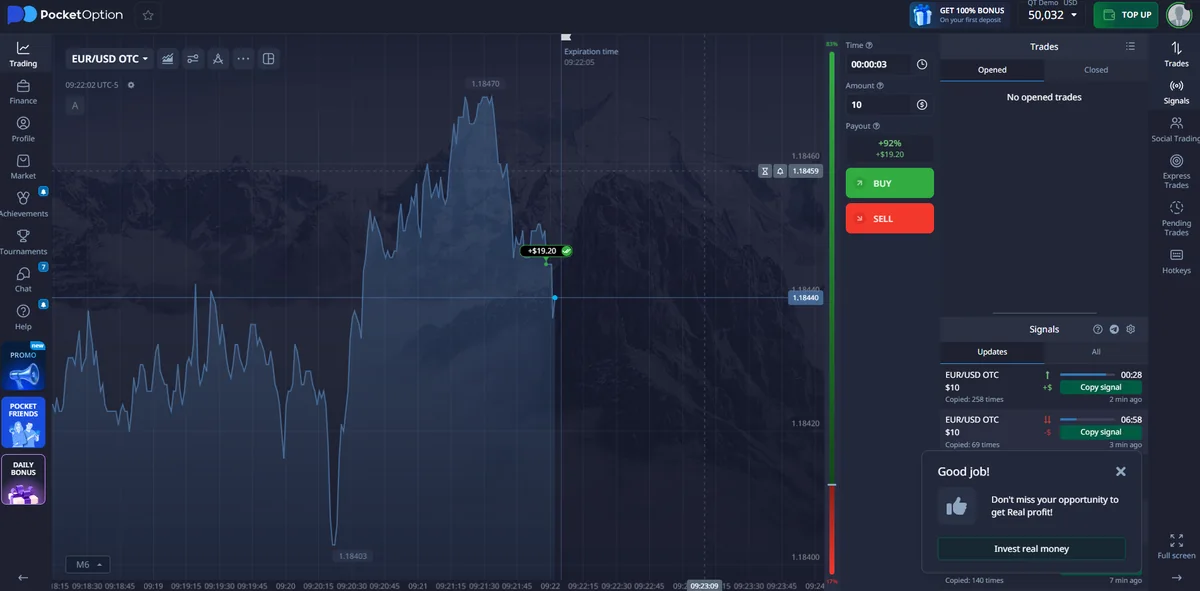
Watch our 2:24 Pocket Option test
The video shows the terminal, assets, indicators, $10 QT Demo trades, Signals and Social Trading from our September 3 test.
What we tested
- EUR/USD OTC trade placement and results
- Asset categories and payout percentages
- Indicator catalogue and chart overlays
- Signals and Copy signal
- Social Trading rankings and trader profiles
- Deposit and withdrawal account screens
Test boundary
The $10 trading session used the QT Demo account. We checked the cashier before funding, and trader-copy execution itself was not completed because the platform required adding money.
Pocket Option Demo Account and Trading Test
The Pocket Option demo is the easiest part of the product to verify before adding money. Our account showed a QT Demo USD balance around $50,000. The terminal displayed the selected asset, expiry/time control, trade amount, current payout and large BUY/SELL buttons on the right side of the chart.
We placed $10 trades on Pocket Option during our hands-on platform test. The session used the QT Demo account. On EUR/USD OTC, one closed position displayed a $19.20 return, equal to $9.20 profit on that $10 test position; another later result displayed $0. These are observed test outcomes, not a claim that the same payout or result will repeat.
Pocket Option’s own trading guide states a $1 minimum trade amount. We did not use the minimum ticket in this session, so our first-hand finding is narrower: the $10 order flow worked, results appeared in the interface and the live payout was visible before entry.
If your goal is to learn the interface, this is the useful part of the demo: you can test asset selection, expiry, payout visibility, stake control and result history before deciding whether the platform fits your workflow.
For a broader comparison of practice accounts, see our binary options demo account guide.
Pocket Option Assets, OTC Markets and Payouts
The asset menu was broader than a simple currency list. We opened five categories in the same account: Currencies, Cryptocurrencies, Commodities, Stocks and Indices. The list also included a Schedule section and a large number of OTC-labelled symbols.
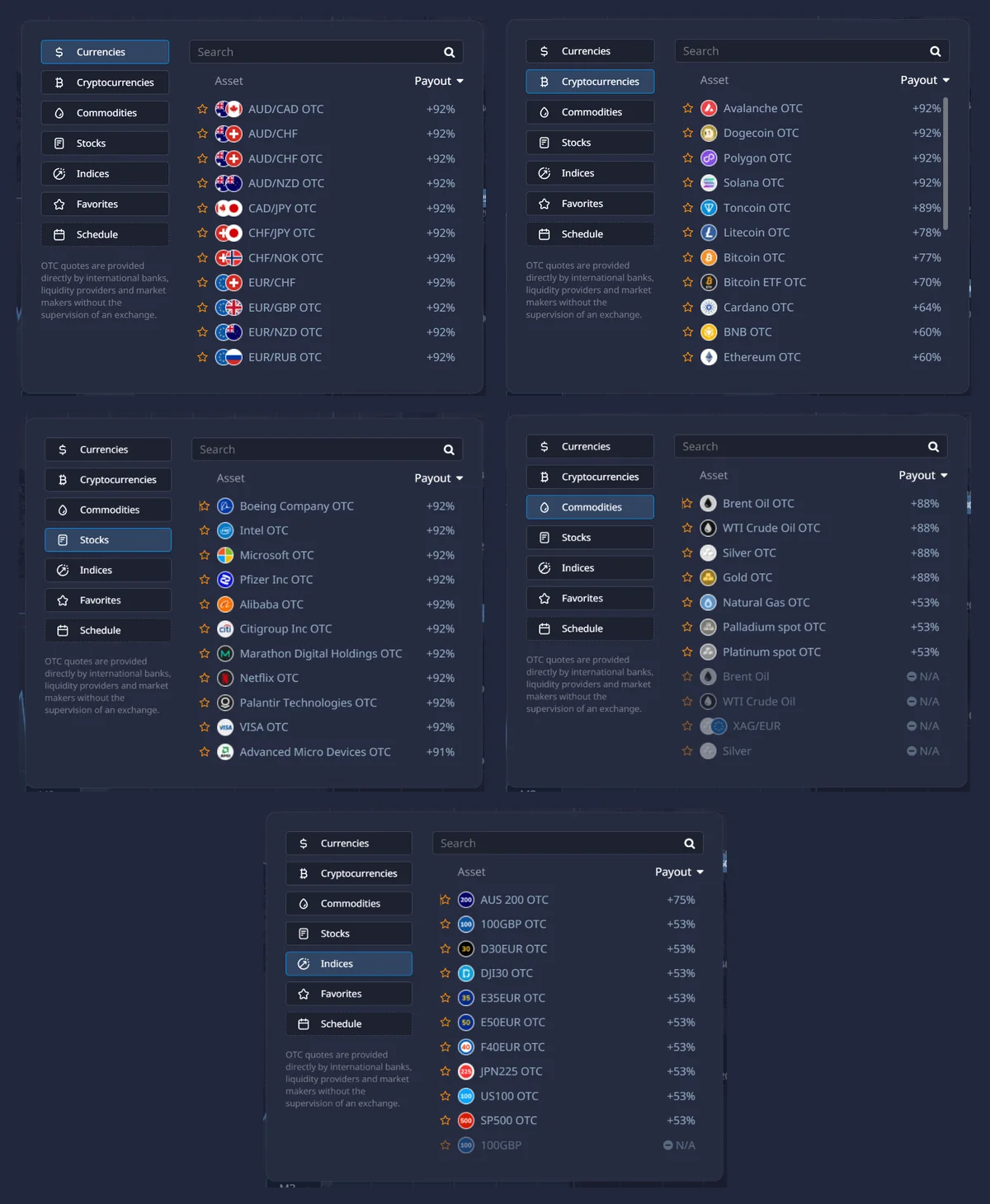
In our captures, several currency and stock OTC symbols showed 92%, while other markets displayed lower figures. Crypto varied widely by symbol, and some non-OTC instruments were marked N/A at that moment. This is why a single number such as “Pocket Option pays 92%” is incomplete: the operational value is the payout shown beside the exact asset when the trade is being prepared.
OTC also matters for interpretation. An OTC-labelled contract should be treated as the platform’s quoted contract for that session, not automatically as an exchange-traded instrument with the same price formation. The exact label on the ticket is part of the trade.
Pocket Option Indicators and Chart Tools
The indicator catalogue is one of the stronger parts of the browser terminal. Our screenshot shows tools including ADX, Alligator, Average True Range, Bollinger Bands, CCI, Ichimoku Kinko Hyo, MACD, Moving Average, Parabolic SAR, RSI, Stochastic Oscillator, SuperTrend, Volume and ZigZag, among others.
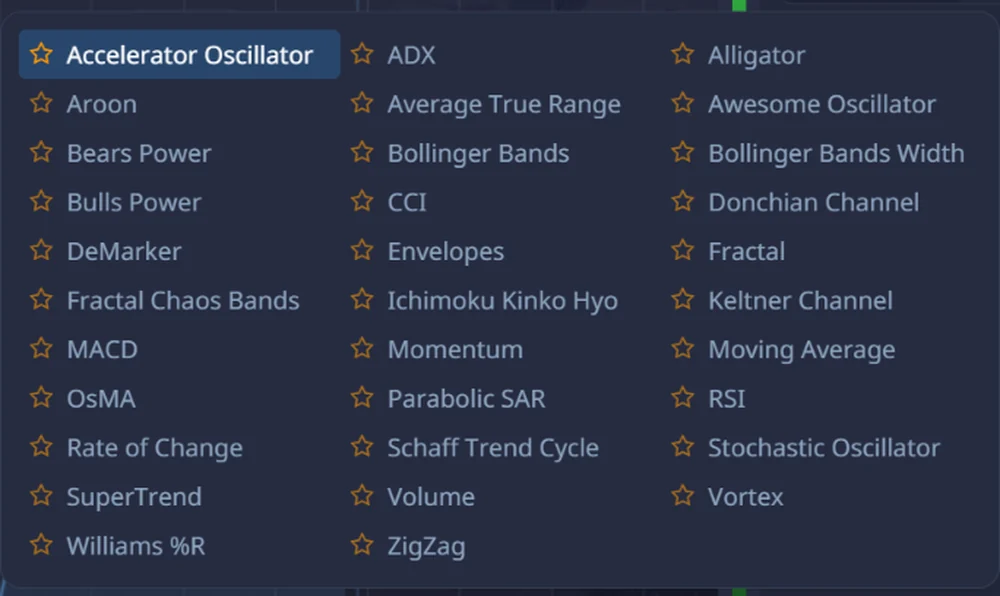
We did more than open the menu: during the video test we applied multiple indicators to the chart. That confirms the workflow is usable in demo. It does not prove that any indicator combination produces a trading edge, so this review does not score Pocket Option on hypothetical strategy profitability.
Pocket Option Signals: We Tested Copy Signal
Pocket Option includes a built-in Signals panel inside the terminal. In our session the panel displayed EUR/USD OTC signal rows with direction arrows, time information, a $10 amount and a green Copy signal button. The panel also showed how many times individual signals had been copied.
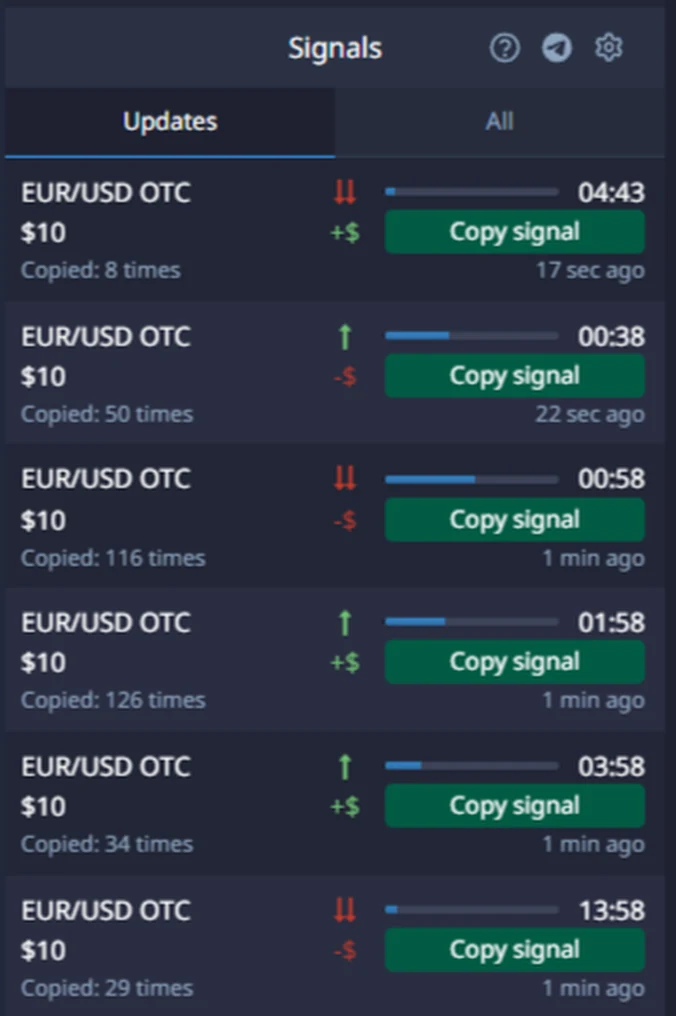
We clicked Copy signal in demo and the copied trade markers appeared on the chart. That is enough to confirm the feature path worked in our account. It is not enough to make an accuracy claim. A handful of signals cannot establish a stable win rate, and the displayed payout still matters for the break-even rate of each trade.
Pocket Option Deposit and Withdrawal Check
We opened the logged-in Finance area without sending money. On September 3, 2026, the Account top-up screen displayed Minimum deposit amount: $10. The same screen showed method-specific differences: examples visible in our captures included $10 routes, Visa/Mastercard at $20 and USDT TRC20 at $30. Other crypto routes farther down the list also used different minimums.
That is more useful than treating one advertising number as universal. Pocket Option’s Public Offer contains a generic deposit baseline of $0.10 unless another amount applies, while its public educational material advertises entry from $5. In practice, the account cashier can set a higher method-specific minimum. The dedicated Pocket Option minimum deposit guide owns the full deposit-method intent; this review keeps only the decision-level answer.
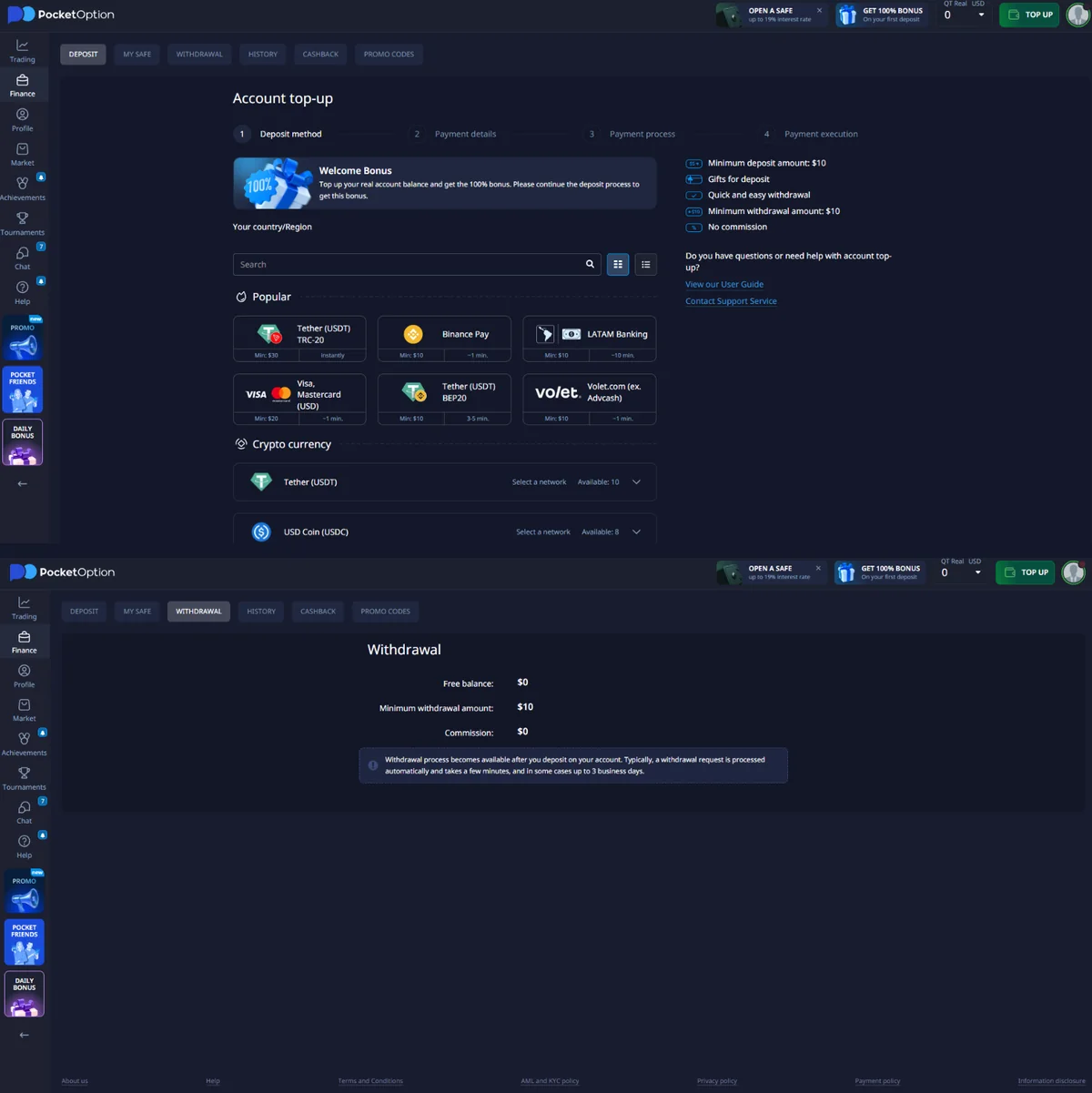
| Cashier item | Observed in our account |
|---|---|
| Account top-up minimum | $10 displayed on September 3, 2026 |
| Example route minimums | $10, $20 and $30 appeared on the visible methods; deeper crypto routes varied further |
| Minimum withdrawal | $10 |
| Withdrawal commission | $0 on the screen we checked |
| Withdrawal access | Screen stated it becomes available after a deposit |
| Screen timing statement | Typically a few minutes; in some cases up to 3 business days |
| Cashier status | Checked before funding; no withdrawal request submitted |
Pocket Option’s Payment Policy adds a broader rule: available deposit and withdrawal methods are the methods shown in the account, withdrawal timing depends on the selected method, and minimum/maximum limits can be set in the dashboard. The same policy also allows identity and payment-document checks. A clean withdrawal screen is useful evidence of the interface, but it is not withdrawal proof.
Pocket Option Official Site, PocketOption.com and Login
The official public domain we verified is pocketoption.com. This matters because searchers use both Pocket Option and the joined spelling PocketOption, and login/lookalike pages can appear around a well-known brand.
For Pocket Option login or PocketOption login, use the Log In control on the verified Pocket Option domain and the same email or authentication method used for registration. Do not send a password or one-time code to a third party, and do not install an APK from a random mirror simply because it uses the brand name.
The buttons on Best Binary Brokers use our tracked affiliate URL rather than linking directly to an untracked app store or login page. After clicking, check that the final destination is part of the current Pocket Option flow before entering credentials or payment information.
Sponsored affiliate link. The verified public brand domain is pocketoption.com; availability depends on residence and current terms.
Pocket Option App and Browser Access
Our first-hand test used the browser platform, so that is the interface we can describe most confidently. Pocket Option’s current site also lists Android, APK and web-app routes. Browser access has one practical advantage for a first check: there is nothing extra to install before you inspect the demo, asset menu, Signals and account settings.
For mobile use, start from the verified Pocket Option domain or the logged-in account. We do not send readers to third-party APK mirrors because app availability and package distribution can change by region.
Is Pocket Option Legit, Safe or a Scam?
Pocket Option is a real operating platform, not an empty fake website. We logged into the service, placed trades during our hands-on platform test, opened Signals and Social Trading, and inspected the cashier. That establishes that the product and the tested workflows operate. It does not establish top-tier regulatory protection or guaranteed payment performance.
The strongest regulatory warning remains material. The UK FCA warning for PocketOption, last updated February 10, 2026, names pocketoption.com and says the firm is not authorised by the FCA. The FCA also states that UK users would not have normal Financial Ombudsman Service or FSCS protection when dealing with the firm.
The U.S. CFTC’s RED List also includes Pocketoption. The CFTC explains that the RED List covers foreign entities that appear to be acting in a capacity requiring registration but are not registered with the CFTC; inclusion is not itself a court finding that a law was violated.
Pocket Option’s current English site states that it does not provide service to residents of the EEA, USA, Israel, UK, Philippines, Japan and Brazil. Its Public Offer separately lists the United States, Canada and multiple European countries. If your true residence is blocked, the fact that a page loads does not make the account eligible.
Our practical label is therefore simple: real platform, high-risk product, limited top-tier recourse. That is different from calling it a scam, and it is also different from calling it fully regulated or safe.
Pocket Option Pros and Cons After Our Test
Pros
- Demo terminal can be explored before funding.
- Asset menu covers currencies, crypto, commodities, stocks and indices.
- Large built-in indicator catalogue.
- Signals panel and Copy signal worked in our demo session.
- Social Trading rankings and detailed trader profiles are integrated into the platform.
- Deposit and withdrawal information is visible inside the logged-in Finance area.
Cons
- Copying a ranked trader required funding a real account in our test.
- Deposit minimums vary by payment route instead of following one universal number.
- Many visible instruments are OTC, which needs to be understood before comparing prices elsewhere.
- FCA and CFTC records create material regulatory concerns for UK and U.S. users.
- Current Pocket Option materials exclude multiple major jurisdictions.
- Withdrawal performance is not first-hand verified because we did not submit a withdrawal request.
Who Pocket Option Is Best For
Pocket Option makes the most sense for a user who deliberately wants a demo-first, feature-rich browser platform. The strongest use case is not “the lowest deposit.” It is the combination of manual higher/lower trading, a broad asset browser, indicators, Signals and Social Trading in one account.
Choose another category if your first requirement is top-tier regulatory protection, long-term investing or ownership of the underlying asset. If the main decision is between two short-term platforms, use our dedicated Quotex vs Pocket Option or Pocket Option vs IQ Option comparisons rather than forcing those pairwise intents into this review.
Final Verdict: Is Pocket Option Worth Using in 2026?
Pocket Option is worth shortlisting when Signals, Social Trading and a busy feature set are genuine requirements. Our own hands-on test confirms that the trading terminal, $10 trade workflow, assets, indicators, Signals and Social Trading interface are real and usable. The cashier check also gives us current account-level evidence instead of relying only on promotional minimums.
The reason not to choose it is equally clear: Pocket Option does not offer the top-tier protection many users expect from a mainstream regulated broker, and its own country restrictions plus FCA/CFTC records matter. The copy-trader feature also moved beyond demo inspection into a funding requirement in our account.
Start by checking eligibility and the demo. If the interface fits, inspect the live cashier for your exact payment route before funding. Do not treat a ranking, signal, bonus or high displayed payout as proof of future results.
Sponsored affiliate link. Confirm country access, account terms and the current cashier before adding money.
Pocket Option FAQ
Pocket Option is a real operating trading platform with a working demo, public terms and an active account interface. That does not make it top-tier regulated. The FCA lists PocketOption as an unauthorised firm in the UK, and the CFTC RED List includes Pocketoption in the United States. Check country eligibility and the current account terms before funding.
The official public domain we verified is pocketoption.com. Our buttons use a tracked affiliate route that redirects into the current Pocket Option flow. Check the destination domain before entering account or payment details.
Pocket Option login is available from pocketoption.com through the Log In control. Use the same email or sign-in method used for registration. Avoid lookalike domains, unofficial APK pages and third-party messages asking for credentials.
Yes. We tested the Pocket Option demo account first-hand. Our session showed a QT Demo USD balance around $50,000, and we placed $10 trades, opened the asset browser, applied indicators, used Signals and inspected Social Trading before funding the account.
Pocket Option’s own trading guide states that the minimum trade amount is $1. In our recorded demo session we used $10 trades; we did not use the lowest possible ticket, so the live Amount control should be checked before each session.
Yes. We opened the Signals panel during our demo test and used the Copy signal control. The panel showed direction, time and amount information. This confirms the feature works in our test session, but it does not establish signal accuracy or future profitability.
Yes. We opened Social Trading, viewed the Top ranked traders for 24h list and inspected trader profiles, statistics and achievements. We did not complete a copied-trader trade because the interface required adding money to a real account.
In our September 3, 2026 test, we could inspect Social Trading profiles from the demo environment, but trying to proceed with trader copying produced an Add money requirement. We therefore did not treat copied-trader execution as demo-tested.
Our account showed currencies, cryptocurrencies, commodities, stocks and indices. Many visible symbols were marked OTC. Payout percentages varied by asset and session, so the live asset list is more useful than a fixed number copied from a review.
Pocket Option publishes low entry figures, but the logged-in cashier is the operational answer. In our September 3 check, the Account top-up screen showed a $10 minimum deposit amount, while individual routes in the same cashier showed minimums such as $10, $20 and $30. The dedicated Pocket Option minimum deposit page contains the deeper method breakdown.
Our logged-in withdrawal screen showed a $10 minimum withdrawal and $0 commission. It also stated that withdrawal becomes available after a deposit. We checked the cashier before funding and did not submit a withdrawal request.
The withdrawal screen we checked said requests are typically processed automatically and take a few minutes, with some cases taking up to three business days. Pocket Option’s Payment Policy also says timing depends on the selected method and sets additional account-side rules. We did not submit a withdrawal request ourselves.
Pocket Option provides web access and publishes mobile routes for Android as well as an APK route. For this review we tested the browser platform. Use the download route from the verified Pocket Option domain or your logged-in account rather than an unofficial mirror.
Pocket Option Social Trading and Copy Trading
Social Trading is the feature that gives Pocket Option a clearer identity than a basic manual-only ticket. We opened the Top ranked traders for 24h list and could see trader results, number of trades and the percentage of profitable trades. We also opened individual profiles containing Trading Statistics, Social Statistics and Achievements.
In our account, Social Trading rankings and profiles were available to inspect, but copying a ranked trader had a funding gate. When we tried to proceed, the interface showed: “Add money to your account in order to copy trades.” So we verified the discovery and profile workflow, while the copied-trader execution itself remained behind the funded-account step.
This distinction matters. Signals and Copy signal worked in our demo session; copying a ranked trader required funding. Those are separate features and should not be described as though they have the same access rules.